••

Menu
CodingVox
CodingVox
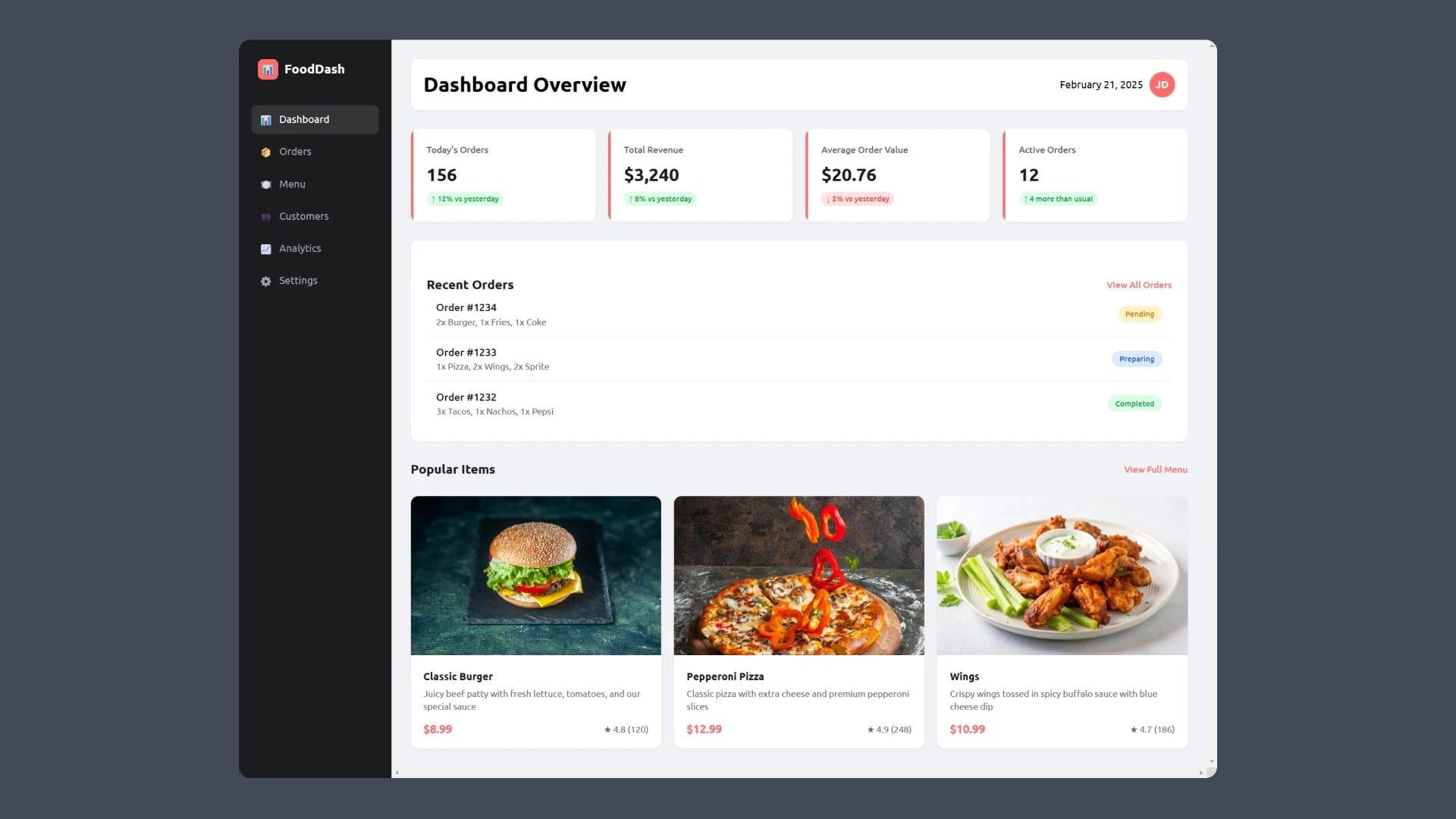
Creating a fast food dashboard with HTML and CSS allows businesses to manage orders, track sales, and enhance user experience efficiently. With a well-structured layout and responsive design, you can build a visually appealing and functional dashboard that meets the needs of a fast-paced food business. check out finance dashboard with HTML and CSS
HTML and CSS provide the foundational structure and styling for any web-based dashboard. They allow developers to create responsive, user-friendly interfaces without relying on complex frameworks.
Building a fast food dashboard with HTML and CSS is a straightforward yet powerful way to create a responsive and user-friendly interface. By leveraging CSS for styling and HTML for structuring, you can design an efficient dashboard for managing fast food business operations.
Begin by structuring the dashboard using HTML elements like <div>, <nav>, and <section>.
Use CSS to enhance the appearance of the dashboard.
<!DOCTYPE html><html lang="en"><head><meta charset="UTF-8" /><meta name="viewport" content="width=device-width, initial-scale=1.0" /><title>Fast Food Dashboard</title><link rel="stylesheet" href="./style.css" /></head><body><aside class="sidebar"><div class="sidebar-logo"><divstyle="width: 32px;height: 32px;background: var(--primary);border-radius: 8px;display: flex;justify-content: center;align-items: center;">📊</div><h2>FoodDash</h2></div><nav><ul class="nav-menu"><li class="nav-item"><a href="#" class="nav-link active"><div>📊</div><span>Dashboard</span></a></li><li class="nav-item"><a href="#" class="nav-link"><div>📦</div><span>Orders</span></a></li><li class="nav-item"><a href="#" class="nav-link"><div>🍽️</div><span>Menu</span></a></li><li class="nav-item"><a href="#" class="nav-link"><div>👥</div><span>Customers</span></a></li><li class="nav-item"><a href="#" class="nav-link"><div>📈</div><span>Analytics</span></a></li><li class="nav-item"><a href="#" class="nav-link"><div>⚙️</div><span>Settings</span></a></li></ul></nav></aside><main class="main-content"><header class="header"><h1>Dashboard Overview</h1><div class="user-info"><span>February 21, 2025</span><div class="user-avatar">JD</div></div></header><div class="dashboard-grid"><div class="card stat-card"><h3>Today's Orders</h3><div class="number">156</div><div class="trend">↑ 12% vs yesterday</div></div><div class="card stat-card"><h3>Total Revenue</h3><div class="number">$3,240</div><div class="trend">↑ 8% vs yesterday</div></div><div class="card stat-card"><h3>Average Order Value</h3><div class="number">$20.76</div><div class="trend negative">↓ 2% vs yesterday</div></div><div class="card stat-card"><h3>Active Orders</h3><div class="number">12</div><div class="trend">↑ 4 more than usual</div></div></div><div class="orders-list"><div class="orders-header"><h2>Recent Orders</h2><a href="#" class="view-all">View All Orders</a></div><div class="order-item"><div class="order-info"><h4>Order #1234</h4><p>2x Burger, 1x Fries, 1x Coke</p></div><span class="order-status status-pending">Pending</span></div><div class="order-item"><div class="order-info"><h4>Order #1233</h4><p>1x Pizza, 2x Wings, 2x Sprite</p></div><span class="order-status status-preparing">Preparing</span></div><div class="order-item"><div class="order-info"><h4>Order #1232</h4><p>3x Tacos, 1x Nachos, 1x Pepsi</p></div><span class="order-status status-completed">Completed</span></div></div><div class="orders-header"><h2>Popular Items</h2><a href="#" class="view-all">View Full Menu</a></div><div class="popular-items"><div class="menu-item"><img src="./images/burger.jpg" alt="Burger" /><div class="menu-item-info"><h4>Classic Burger</h4><p>Juicy beef patty with fresh lettuce, tomatoes, and our specialsauce</p><div class="menu-item-footer"><span class="price">$8.99</span><span class="rating">★ 4.8 (120)</span></div></div></div><div class="menu-item"><img src="./images/pizza.jpg" alt="Pizza" /><div class="menu-item-info"><h4>Pepperoni Pizza</h4><p>Classic pizza with extra cheese and premium pepperoni slices</p><div class="menu-item-footer"><span class="price">$12.99</span><span class="rating">★ 4.9 (248)</span></div></div></div><div class="menu-item"><img src="./images/wings.jpg" alt="Wings" /><div class="menu-item-info"><h4>Wings</h4><p>Crispy wings tossed in spicy buffalo sauce with blue cheese dip</p><div class="menu-item-footer"><span class="price">$10.99</span><span class="rating">★ 4.7 (186)</span></div></div></div></div></main></body></html>
@import url("https://fonts.googleapis.com/css2?family=Ubuntu:ital,wght@0,300;0,400;0,500;0,700;1,300;1,400;1,500;1,700&display=swap");* {margin: 0;padding: 0;box-sizing: border-box;font-family: "Ubuntu", serif;}:root {--primary: #ff6b6b;--secondary: #4ecdc4;--dark: #1a1c1e;--light: #f9f9f9;--sidebar-width: 240px;}body {background-color: #f0f2f5;display: flex;min-height: 100vh;}.sidebar {width: var(--sidebar-width);background: var(--dark);padding: 20px;position: fixed;top: 0;left: 0;bottom: 0;height: 100%;color: white;}.sidebar-logo {display: flex;align-items: center;gap: 10px;padding: 10px;margin-bottom: 30px;}.sidebar-logo h2 {font-size: 20px;font-weight: 600;}.nav-menu {list-style: none;}.nav-item {margin-bottom: 5px;}.nav-link {display: flex;align-items: center;padding: 12px;color: #a1a1aa;text-decoration: none;border-radius: 8px;transition: all 0.3s ease;}.nav-link:hover,.nav-link.active {background: rgba(255, 255, 255, 0.1);color: white;}.nav-link span {margin-left: 10px;}.main-content {flex: 1;margin-left: var(--sidebar-width);padding: 30px;overflow: scroll;}.header {display: flex;justify-content: space-between;align-items: center;margin-bottom: 30px;background: white;padding: 20px;border-radius: 12px;box-shadow: 0 2px 4px rgba(0, 0, 0, 0.05);}.user-info {display: flex;align-items: center;gap: 10px;}.user-avatar {width: 40px;height: 40px;border-radius: 50%;background: var(--primary);display: flex;align-items: center;justify-content: center;color: white;font-weight: bold;}.dashboard-grid {display: grid;grid-template-columns: repeat(auto-fit, minmax(280px, 1fr));gap: 20px;margin-bottom: 30px;}.card {background: white;padding: 25px;border-radius: 12px;box-shadow: 0 2px 4px rgba(0, 0, 0, 0.05);transition: transform 0.2s ease;}.card:hover {transform: translateY(-2px);}.stat-card {position: relative;overflow: hidden;}.stat-card::before {content: "";position: absolute;top: 0;left: 0;width: 4px;height: 100%;background: var(--primary);border-radius: 4px 0 0 4px;}.stat-card h3 {color: #666;font-size: 14px;margin-bottom: 15px;font-weight: 500;}.stat-card .number {color: var(--dark);font-size: 28px;font-weight: bold;margin-bottom: 10px;}.stat-card .trend {display: inline-flex;align-items: center;padding: 4px 8px;border-radius: 15px;font-size: 12px;font-weight: 500;background: #dcfce7;color: #16a34a;}.trend.negative {background: #fee2e2;color: #ef4444;}.orders-list {background: white;border-radius: 12px;padding: 25px;box-shadow: 0 2px 4px rgba(0, 0, 0, 0.05);}.orders-header {display: flex;justify-content: space-between;align-items: center;margin-top: 2rem;}.orders-header h2 {color: var(--dark);font-size: 20px;}.view-all {color: var(--primary);text-decoration: none;font-size: 14px;font-weight: 500;}.order-item {display: flex;justify-content: space-between;align-items: center;padding: 15px;border-bottom: 1px solid #eee;transition: background-color 0.2s ease;}.order-item:hover {background-color: #f9fafb;}.order-item:last-child {border-bottom: none;}.order-info h4 {color: var(--dark);margin-bottom: 5px;font-weight: 500;}.order-info p {color: #666;font-size: 14px;}.order-status {padding: 6px 12px;border-radius: 20px;font-size: 12px;font-weight: 500;}.status-pending {background: #fef3c7;color: #d97706;}.status-preparing {background: #dbeafe;color: #2563eb;}.status-completed {background: #dcfce7;color: #16a34a;}.popular-items {display: grid;grid-template-columns: repeat(auto-fit, minmax(250px, 1fr));gap: 20px;margin-top: 30px;}.menu-item {background: white;border-radius: 12px;overflow: hidden;box-shadow: 0 2px 4px rgba(0, 0, 0, 0.05);transition: transform 0.2s ease;}.menu-item:hover {transform: translateY(-2px);}.menu-item img {width: 100%;height: 250px;object-fit: cover;}.menu-item-info {padding: 20px;}.menu-item-info h4 {color: var(--dark);margin-bottom: 8px;font-size: 16px;}.menu-item-info p {color: #666;font-size: 14px;margin-bottom: 15px;line-height: 1.4;}.menu-item-footer {display: flex;justify-content: space-between;align-items: center;}.price {color: var(--primary);font-weight: bold;font-size: 18px;}.rating {display: flex;align-items: center;gap: 4px;color: #666;font-size: 14px;}@media (max-width: 768px) {.sidebar {width: 70px;padding: 10px;}.sidebar-logo h2,.nav-link span {display: none;}.header h1 {font-size: 16px;}.header span {display: none;}.main-content {margin-left: 70px;}}
Developer
Join 1,000+ developers getting weekly web development tips and code snippets
Found this helpful? Share it with others!